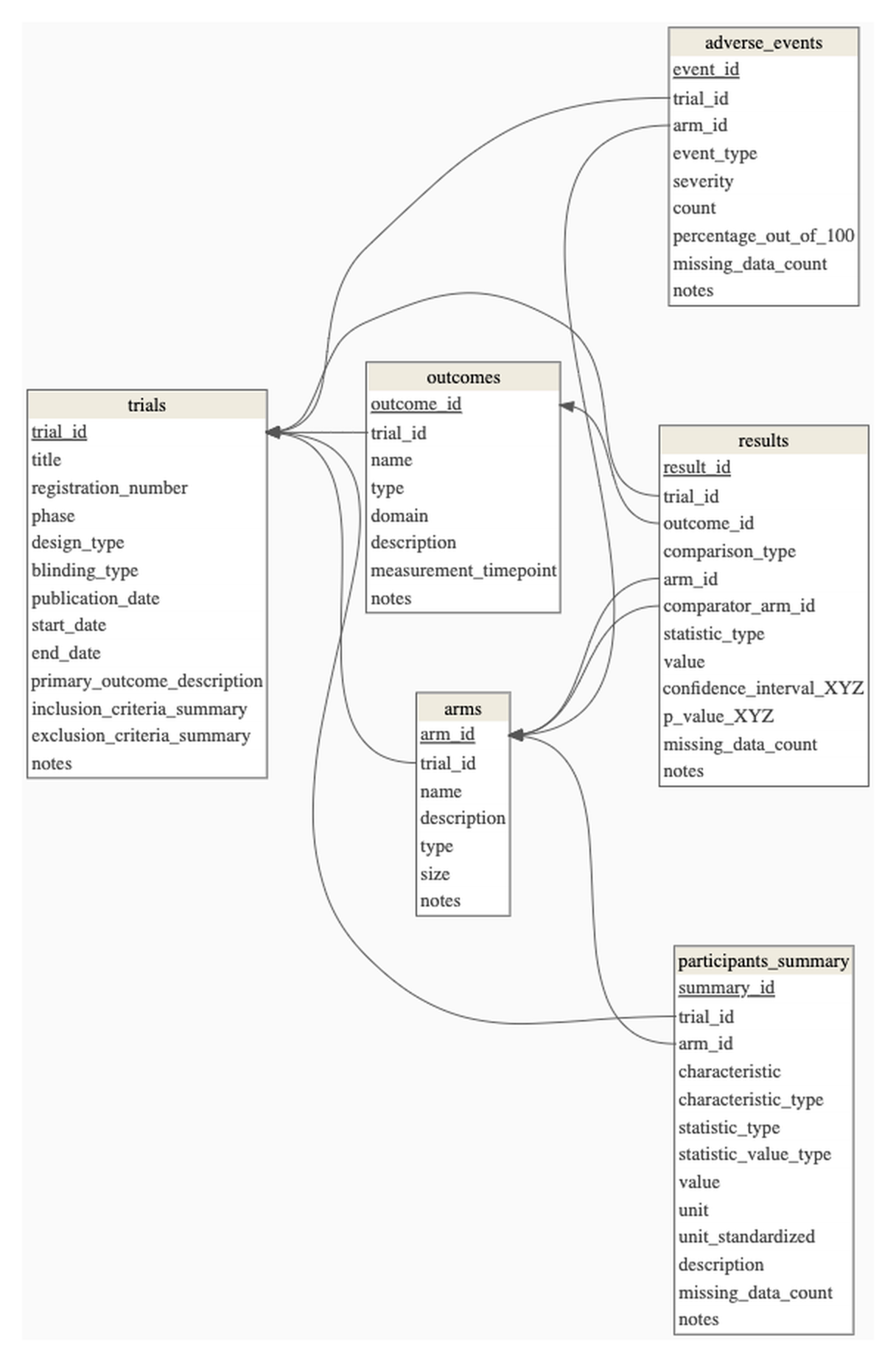
Each document contributes zero, one, or more rows to each table, and the rows are linked to each other.
One clinical trial paper fills six tables at once: the trial, its arms, its outcomes, one row per result, one per adverse event, one per participant characteristic. The lines are what hold them together.
Give each list its own table. Join them on a key.
@karlrohe
A cell can hold one list. It cannot hold two lists that mix and match. A trial reports four arms. Each arm receives one or more interventions. The same intervention turns up in more than one arm. There is no way to write that down in a single column of a single row.
Arms and interventions are two different lists. The arms are the groups people were randomised into. The interventions are the things given to them. A three-arm trial can use two interventions. A two-arm trial can use five. Neither list tells you how long the other one is.
What joins them is a key. Give every arm a short label the reader pulls out of the paper. Every other table then names arms by that label. An intervention row says which arm it belongs to. An effect row says which two arms it compares. When one intervention appears in two arms, it takes one row per pairing.
Six tables is a normal size for a design like this. The one on the card is a real Data Mint design for randomised trials. Everything hangs off trials. Arms, outcomes, results, adverse events and participant characteristics each get their own table, and each carries the ids it needs to join back.
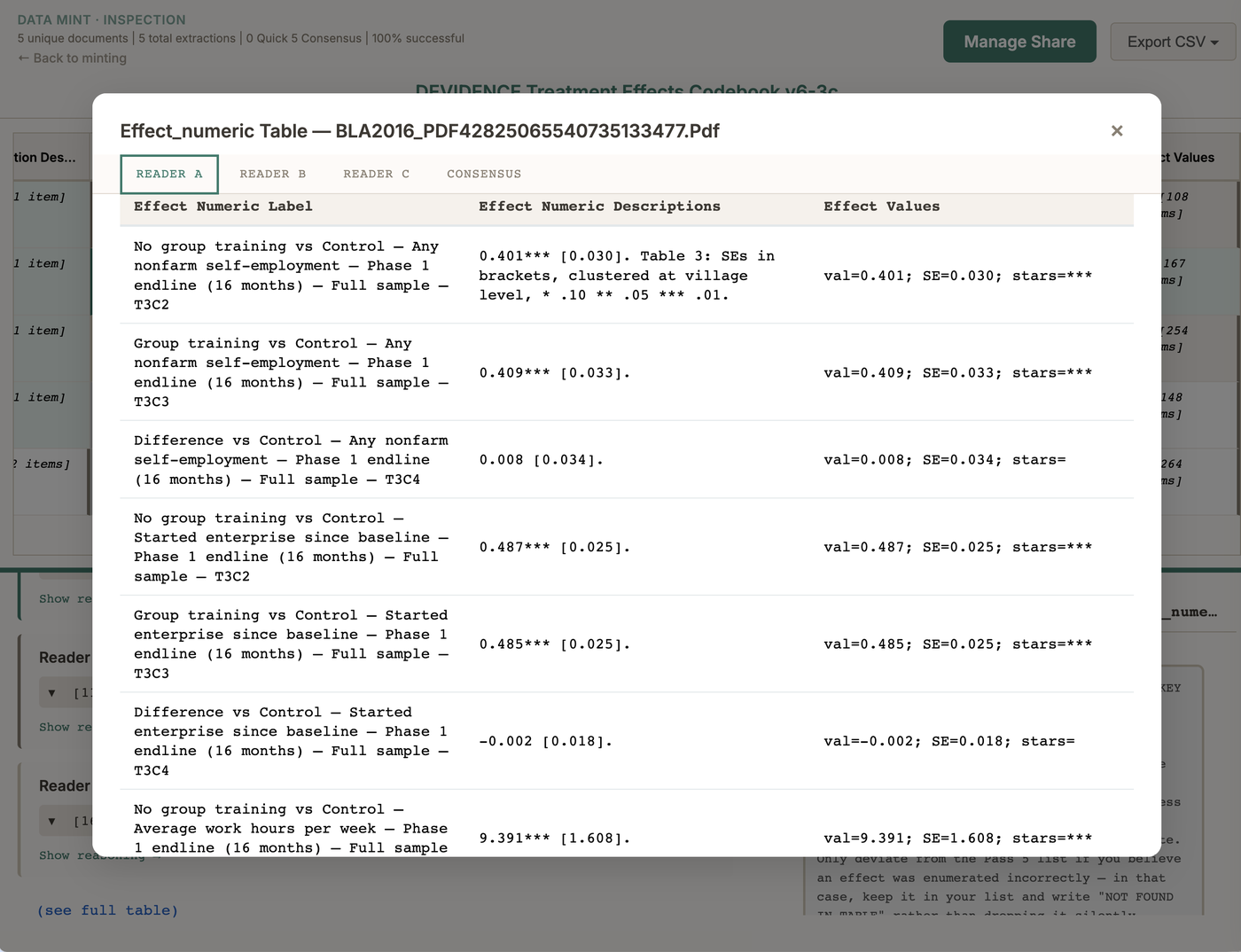
In the results grid each table sits behind one cell. Open the cell and the table unfolds, with the key column on the left and one tab per reader.
One cell, opened. The left column is the key. Every column beside it was answered once per row.
Data Mint writes this with two tags.type=KEY marks the column whose list defines the rows. type=FK marks a column that points at the key of another table. Four fields, trimmed to the tags that do the structural work:
## arm_label
**Settings:** phase=1, table=arm, type=KEY
**Question:** What are the arms of this trial? Give each one a short label.
**Answer Type:** list

## arm_size
**Settings:** phase=1, table=arm, type=COL
**Question:** For each arm, how many participants were assigned to it?
**Answer Type:** list

## effect_descriptions
**Settings:** phase=2, table=effect, type=KEY
**Question:** What treatment effects does this paper report?
**Answer Type:** list

## effect_arm
**Settings:** phase=2, table=effect, type=FK, ref=armTABLE.arm_label
**Question:** For each effect, which arm was measured?
**Answer Type:** list
A foreign key can only point backwards. The table it references has to run in a strictly earlier phase. The arms come out first. Then the engine injects those verified arm labels into the effect question. A reader choosing an arm for an effect can only choose an arm that was already found.
Setting this up today starts with a conversation. The assistant in Data Mint drafts codebooks on its own up to about three passes, three output tables, and fifteen to twenty fields per pass. Past that it stops guessing and points you at me. Write to karl@datamint.ing and we work through the tables together.